Made with Livote
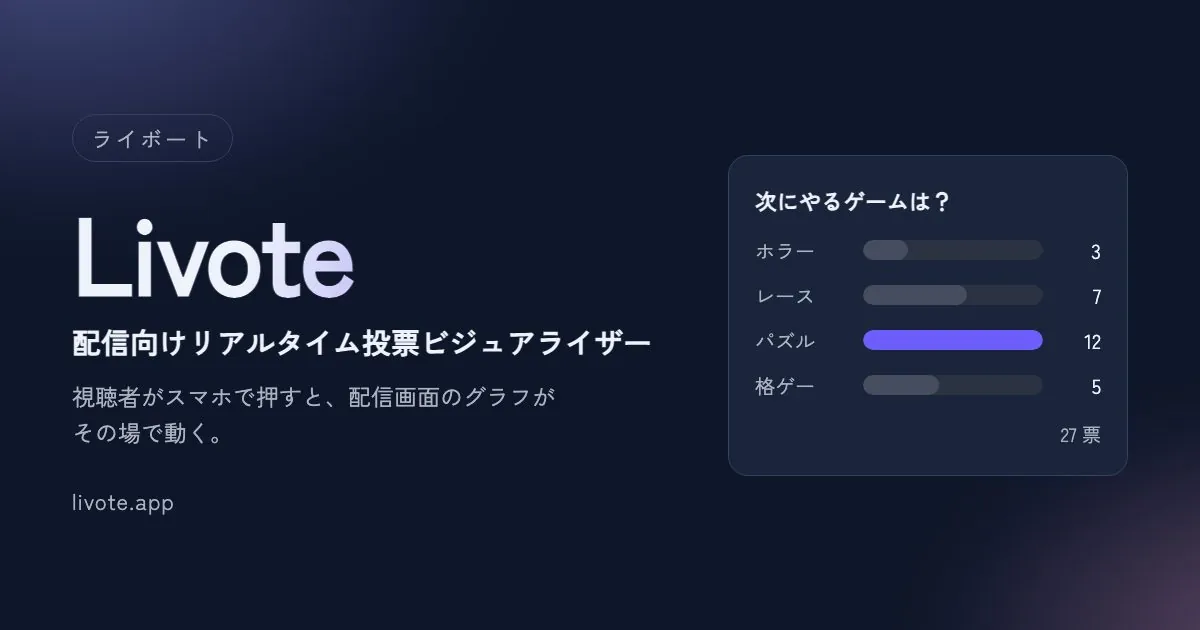
Make a live viewer poll for your stream with Livote
Viewers scan a QR code and tap on their phones.
The chart on your stream moves the moment a vote comes in.
· VirtualCross
What you can make
Livote is a polling tool you overlay on your stream. Answers to "Which one should I pick?" turn into numbers and a chart the moment viewers tap. No more reading through chat and counting by eye. Viewers don't need an app or an account.
Choices in gaming streams
Let viewers decide which route to take next or which character to pick.
Polls on talk streams
The vote is split, or there's a comeback. The moving numbers become your next topic.
Quizzes at online events
Keep the results hidden until the reveal, then show everyone at once after voting closes.
Three steps to get started
Write your questions
Create an event and enter your questions and choices. Each event can hold up to 20 questions. Creating an event gives you a QR code and an 8-digit join code.
Paste the URL into OBS
Paste the display URL into a "Browser" source in OBS. No dedicated app or virtual camera needed. The background is transparent, so it sits right on top of your stream video.
Show the QR code on stream
When viewers scan the QR code, the voting screen opens. The chart on your stream moves the moment they tap, and rows swap places when the ranking changes.
To run the same segment again, you can duplicate the event.
Just one screen to work during the stream
The console has four states: "Please wait," "Voting open," "Closed," and "Results." Press one and everyone's screen switches at the same time. While voting is open, you can hide the numbers separately on participants' screens and on the stream, so you can keep them secret until the results. The same screen shown in OBS also appears on your end, so you can keep track of what's on stream as you go.
Choosing the look
There are five design templates (Neon, Kawaii, Pop, Clean, and Minimal) and three chart types (bar, line, and pie). All of them are available on every plan.
Choosing a plan
The OBS browser source and the templates are available from the Free plan. On the Free plan, a small logo appears in the corner of the stream.
| Free | Starter | Pro | |
|---|---|---|---|
| Monthly | ¥0 | ¥1,980 | ¥4,980 |
| Concurrent participants | 50 | 10,000 | 100,000 |
| Streaming allowance | 30 min × 2/month | 5 tickets/month | 10 tickets/month |
| Hide the logo | — | ○ | ○ |
| Photo buttons and rapid-tap mode | — | ○ | ○ |
Paid plans stream with "tickets." One ticket covers one hour of streaming for up to 10,000 people. For commercial use by companies, there's a Business plan for up to 1,000,000 concurrent participants (from ¥49,800/month, annual billing only, by consultation).
Details as of October 2026. Check the Livote website for current pricing and how tickets work.
Want an interactive system built for your event or show?
We build systems where visitors or viewers join from their phones and the results appear on screen right away, using the same real-time technology as Livote.